This unique iPhone 17 Pro selfie case transforms how you take photos — it even has a MicroSD slot
Review: The Selfix Selfie Case for iPhone 17 Pro
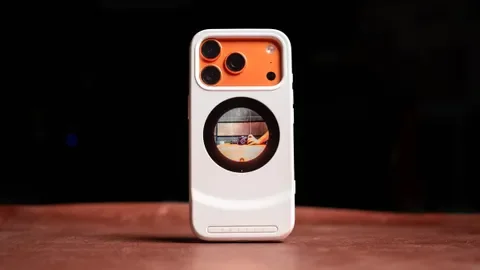
I have tested over 50 different cases for the iPhone 17 Pro, but the Selfix is truly unique. Marketed as a "selfie case," it features a 1.6-inch OLED display on the back. This allows you to use the high-quality rear cameras for selfies. After using it for nearly a month, I can say it is legitimately great.
Price and Availability
The case is currently being crowdfunded and is available for as low as $79, which is quite competitive compared to premium regular cases. It is compatible with both the iPhone 17 Pro and Pro Max models. The project is backed by Dockcase, a brand well-known for launching products on Kickstarter.
Design and Ease of Use
Because it adds a second screen, the case is naturally bulkier than standard options. However, the ease of use is its best feature:
- No App Required: It uses the USB-C port to mirror the display output automatically.
- MagSafe Compatible: Thanks to its circular design, you can still use all your MagSafe accessories.
- Touchscreen Controls: You can access camera settings directly from the rear screen.
Key Features & Storage
One of the most interesting additions is the built-in MicroSD slot. It supports up to 2TB of storage, making it very easy to move large files and free up space on your iPhone's internal memory. While not as fast as an external SSD, it is a very convenient solution for mobile creators.
| Feature | Description |
|---|---|
| Display | 1.6-inch OLED with Touchscreen |
| Charging | Supports Passthrough (65W tested, 45W recommended) |
| Battery Save | Auto-off after 5 minutes of idling |
Power and Connectivity
Since the case occupies the iPhone's USB-C port, it provides its own dedicated port for passthrough charging. I tested it with a 65W USB PD charger without any issues. To ensure everything runs smoothly, I recommend using at least a 45W charger.
To save power, the display turns off after five minutes of inactivity. If you need to wake it up, there is a dedicated button conveniently located on the side of the case.
Latest News
Console Gaming in Your Pocket: The Rise of High-End Emulation
Apr 07, 2026
The AI Revolution: Why Your Mobile Apps are Getting Smarter (and Pricier)
Apr 07, 2026
Steve Jobs: The Visionary Who Reimagined the World in Your Pocket
Apr 07, 2026